NexGuard is now on Google Play✦ Free plan · no card required✦ Works on Android 8.0 and newer✦ On-device encryption, no hidden monitoring✦ NexGuard is now on Google Play✦ Free plan · no card required✦ Works on Android 8.0 and newer✦ On-device encryption, no hidden monitoring✦
Security Score Wi-Fi Safety Privacy Report Authenticator Encrypted Vault App Lock
Now on Google Play · Free, no card

NEXGUARD. All-in-One Privacy Scan & Vault↗

Launch a safer digital life with one honest Android app — a security score, privacy report, encrypted vault and more, all on your own phone.

20 Tools 256-bit Vault 0 Query Logs 8.0+ Android
Stay Private ✦ Stay Secure ✦ Stay Private
Built around real security moments

See where you stand — then fix it

Three signature tools do the heavy lifting: understand your posture, see what apps can reach, and seal what’s private. Each one is deterministic and explainable.

Security · 01

One score, ranked fixes

A single deterministic number for your device — with a short list of fixes ordered by impact.

Explore security
Privacy · 02

See what apps can reach

Turn scattered Android permissions into one readable view, then shut off what shouldn’t be on.

Explore privacy
Private data · 03

Sealed on your device

Store private notes, photos and files encrypted with a key that never leaves your phone.

Explore private data

Made for real life

Security that fits how you live

Your phone goes everywhere you do: the café, the commute, the sofa, a visit to family. NexGuard keeps its checks simple enough to run anywhere, in a minute, on your own phone and on your own terms.


Couple on a sofa looking at a phone together
Smiling woman in a white hijab holding her phone at a desk
Young woman helping an older woman with a phone on a park bench
Three friends sharing a phone at a café table
Woman in a green hijab checking her phone while holding an iced coffee

The complete security picture

20 tools, grouped by what they do for you.

See each job clearly — and how the pieces work together before you decide what to fix first.

01

Security

Your score, apps and Wi-Fi — SafeMode coming with Pro.

02

Privacy

What every app can reach, in one readable view.

03

Account

Two-factor, sessions and checkups — 5 tools.

04

Private data

Vault, password tools and clean-up — 4 tools.

05

Guidance

Clear alerts and honest reports — 2 tools.

06

Digital wellbeing

Screen time, focus and habits — 3 tools.

NG
One connected system
Scan→Understand→Fix→Protect→Watch
Explore the app
20 Tools NEXGUARDAll-in-One Security

Every feature — and everything inside it.

20 tools
Core4 inside

Security Score

One deterministic number for your device, with a short, ranked list of fixes you can act on.

Inside · 4 sub-featuresExplore feature
Core4 inside

Privacy Report

See what every app can reach, grouped by sensitive capability — then shut off what shouldn’t be on.

Inside · 4 sub-featuresExplore feature
Core5 inside

Encrypted Vault

Store private notes, photos and files sealed with AES-256-GCM and a key that never leaves your phone.

Inside · 5 sub-featuresExplore feature
Core3 inside

Authenticator

Generate TOTP two-factor codes on your own device — no cloud, works fully offline.

Inside · 3 sub-featuresExplore feature
Core3 inside

Wi-Fi Safety

A quick, honest read on the network you’re connected to — checked on-device, never logged.

Inside · 3 sub-featuresExplore feature
Core3 inside

App Lock

Lock NexGuard and route you to Android’s own app protections, behind your screen lock.

Inside · 3 sub-featuresExplore feature
Core4 inside

Screen Time

Your usage, habits and limits — computed on-device, free, and never sent anywhere.

Inside · 4 sub-featuresExplore feature
Core4 inside

Password Health

Find weak and reused logins without the server ever seeing them — checked on your phone.

Inside · 4 sub-featuresExplore feature

How it works

One capability leads to the next.

Start with a clear score, fix what matters, seal what’s private, then let NexGuard keep watch — each step builds on the last.

Start with a scan
1

See your Security Score

Assess
2

Review what apps can reach

Assess
3

Open the exact Android setting to fix it

Assess
4

Seal private files in your Vault

Protect
5

Turn on two-factor with the Authenticator

Protect
6

Lock it behind App Lock

Protect
7

Stay covered with alerts & checkups

Live

Security command center

Your whole security posture, on one screen.

These are the panels of your NexGuard dashboard. Open one to see its checks, controls and how it scores.

Every card opens a tool
00 / SCREEN

Dashboard overview

See all your tools move from scan to fixed, together on one screen.

Open the overview
Current panel
01 / SCREEN

Security Score

A single deterministic score, with the fixes ranked by the impact they have.

You are here
02 / SCREEN

Privacy Report

See what every app can reach, and shut off what shouldn’t be on.

Open Privacy
03 / SCREEN

Encrypted Vault

Private notes and files, sealed with a key that never leaves your phone.

Open Vault
04 / SCREEN

Alerts & Checkups

Stay covered — told once, clearly, about what changed on your phone.

Open Alerts

Made for everyday life

Wherever your phone goes, NexGuard goes too

The same simple checks work at home, on the move, at work and with the people you care about.

Couple relaxing on a sofa while one of them uses a phone

At home

Your score and alerts keep watch quietly, so you can put the phone down and relax.

Two young women laughing over a phone at a street café

On the go

On café or airport Wi-Fi? NexGuard checks the network you are on before you trust it.

Woman with a laptop at a café table checking her phone

At work

Keep work files, notes and passwords sealed in the encrypted vault, on your own phone.

Older man showing an older woman something on his phone at the table

With family

Sit down together, run a scan and fix the settings that matter, one tap at a time.

Interface preview

A look at the interface

Real screens from the app — your score, the fixes that matter, and everything in your control.
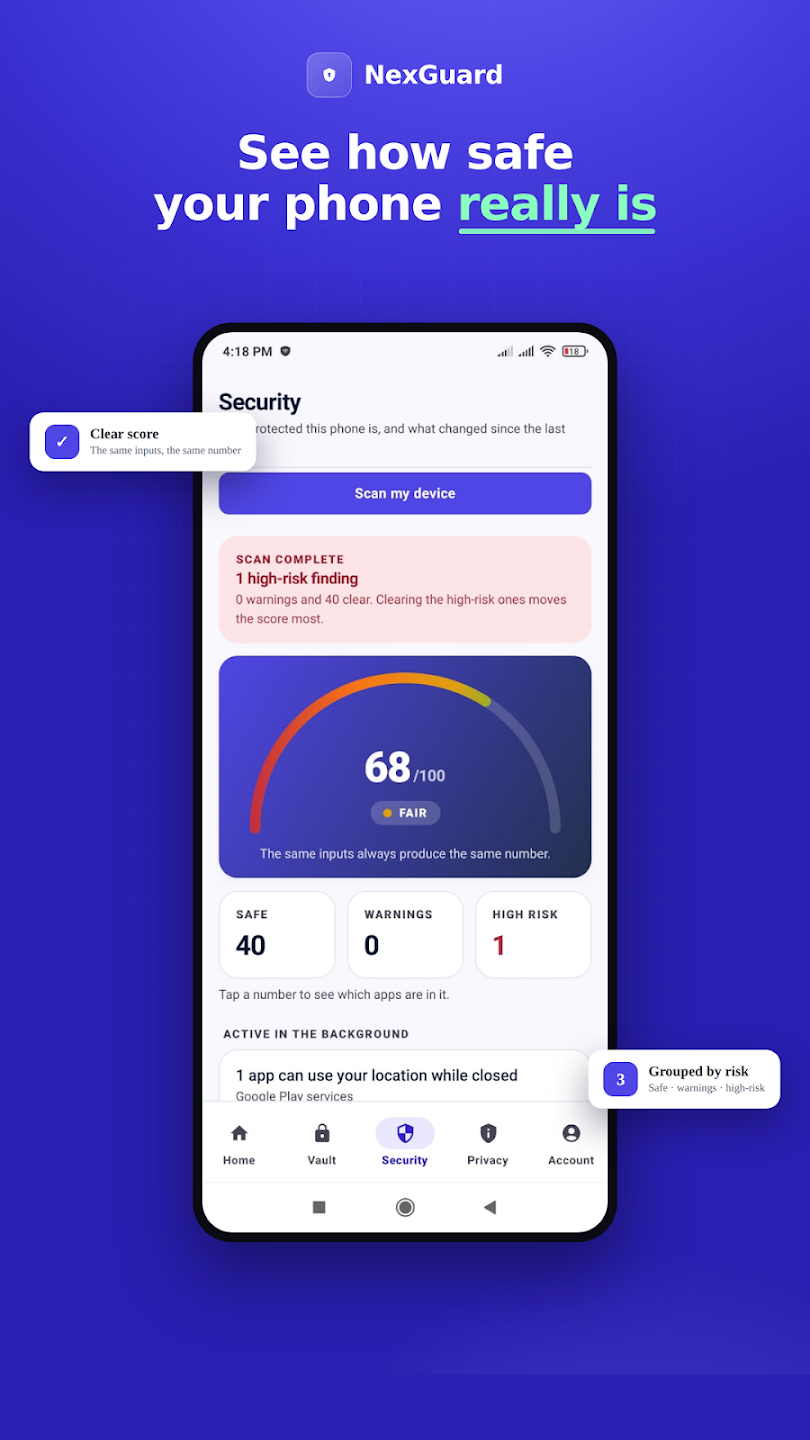
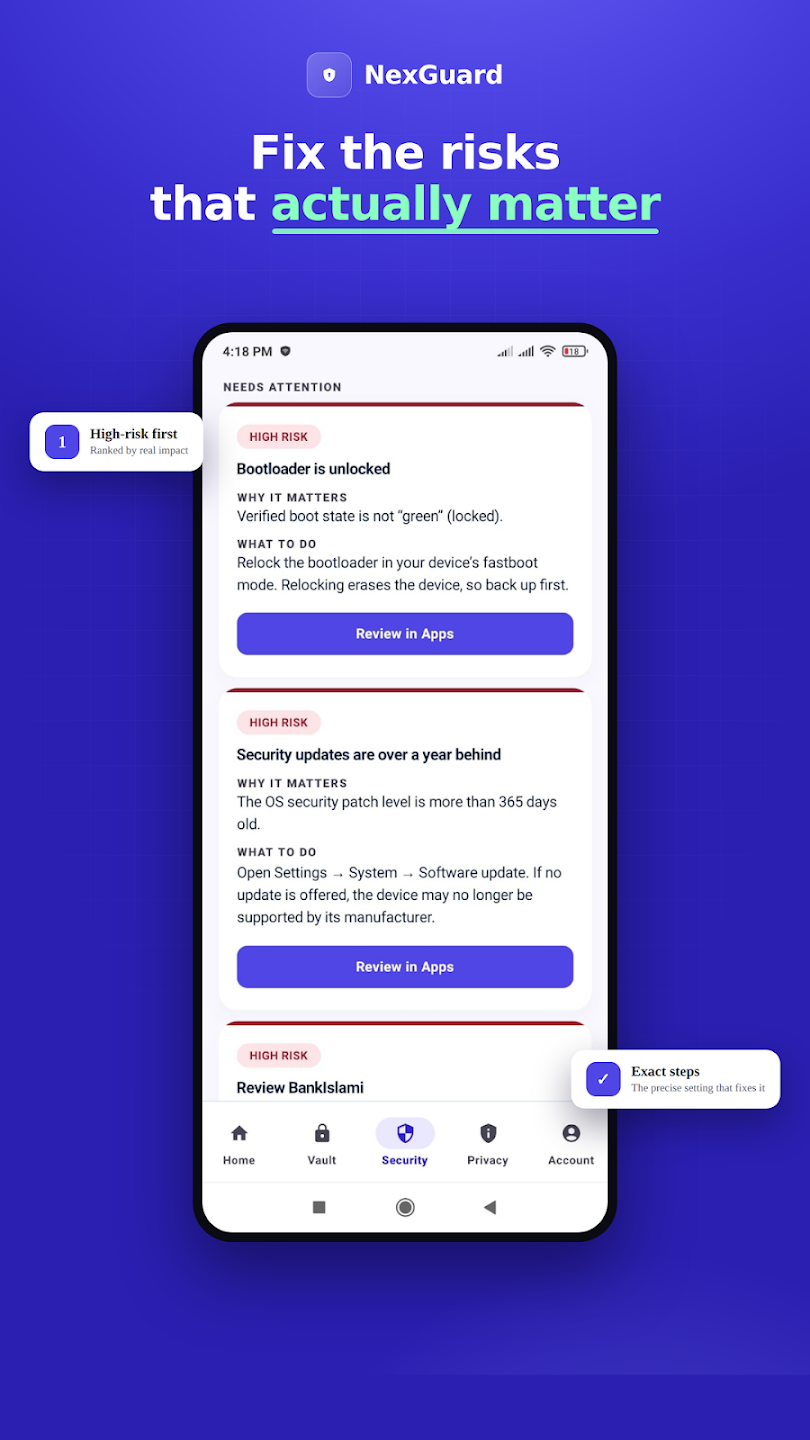
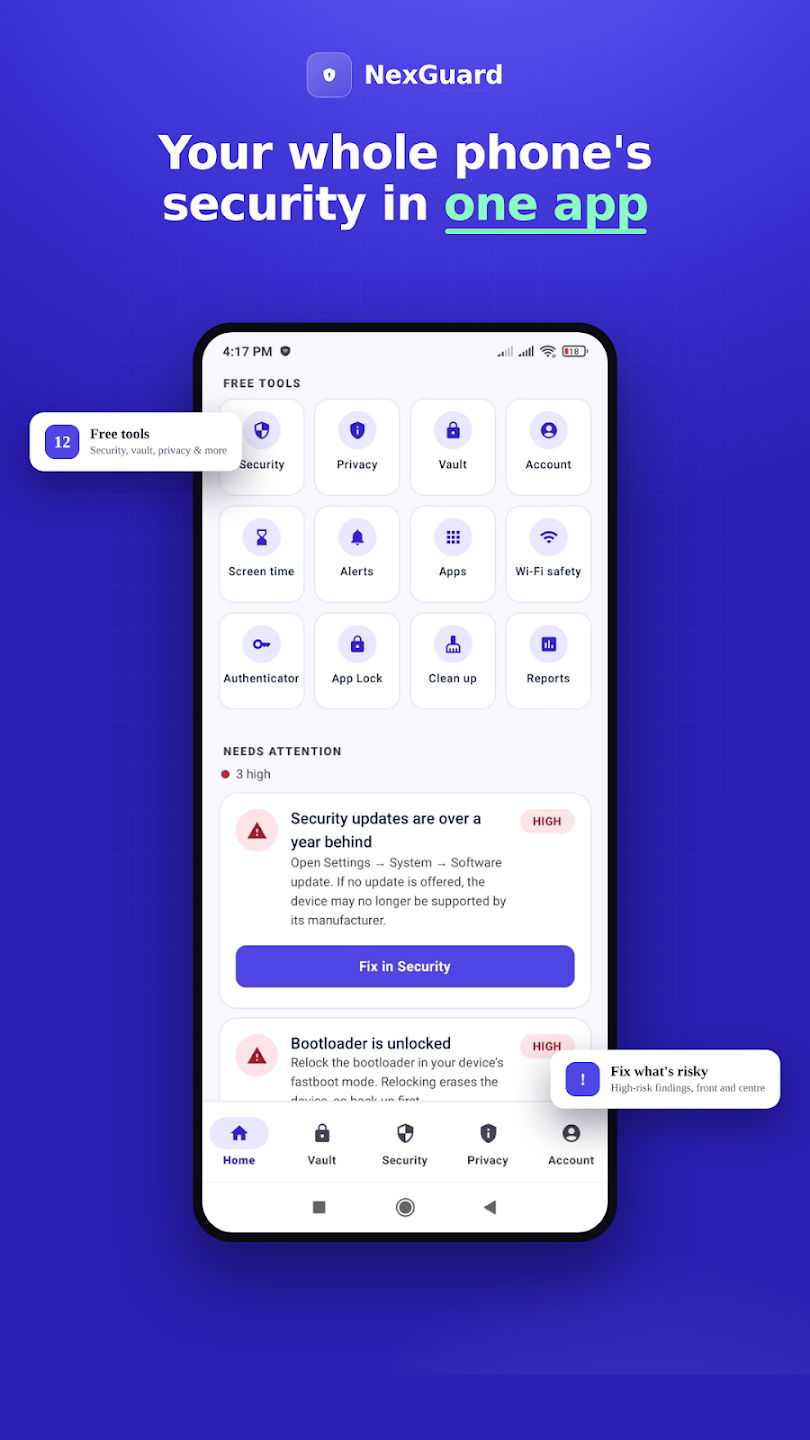
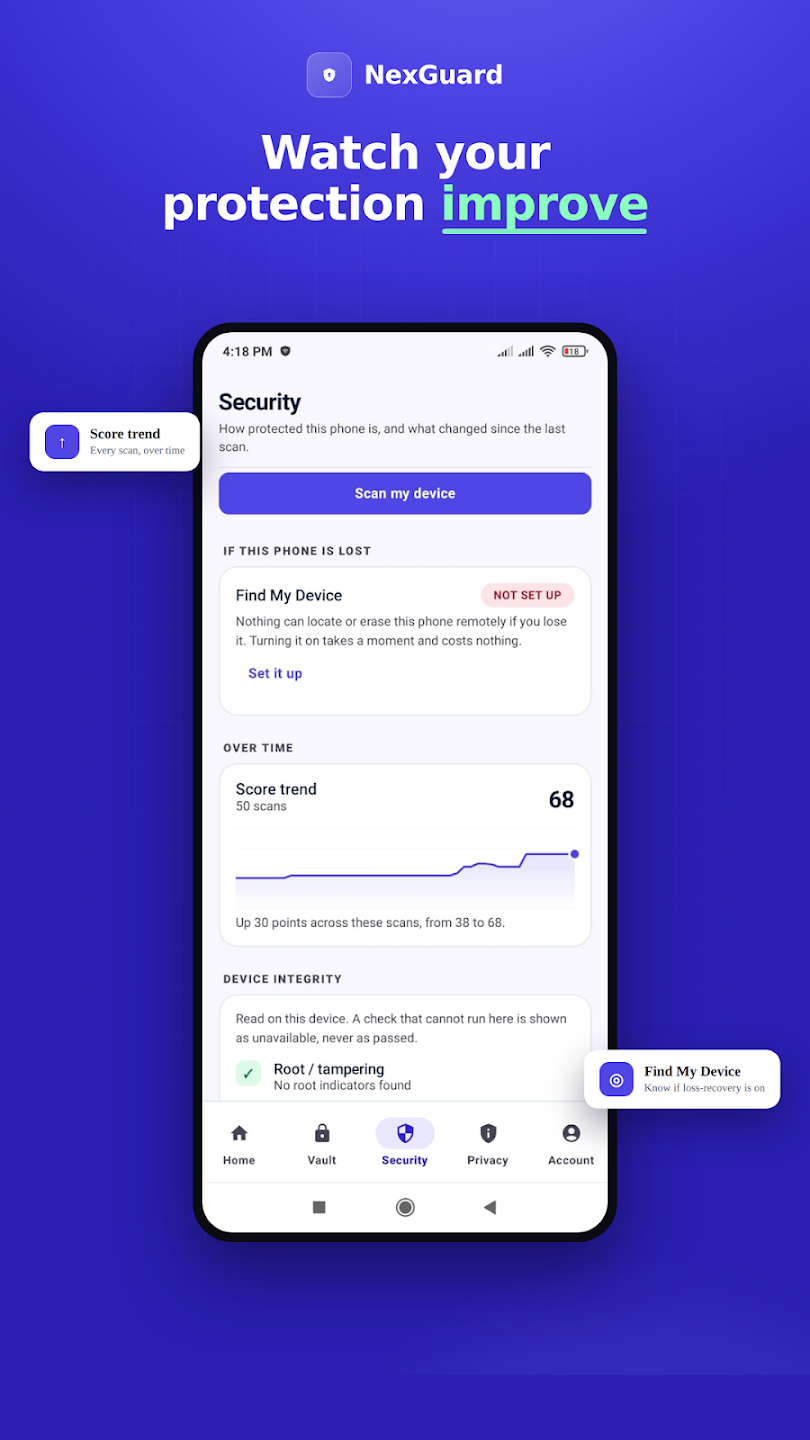
NexGuard Security screen: a device security score of 68 out of 100, rated Fair, with a scan summary of 40 safe items, 0 warnings and 1 high-risk findingNexGuard Needs Attention list: high-risk findings such as an unlocked bootloader and year-old security updates, each with why it matters and what to doNexGuard home screen: a grid of free tools — Security, Privacy, Vault, Screen time, Alerts, Apps, Wi-Fi safety, Authenticator, App Lock, Clean up and ReportsNexGuard score trend chart showing the security score rising over 50 scans, with a Find My Device check and a device integrity result

Getting started

Three steps, then it stays out of your way.

Set it up once. After that, NexGuard stays quiet and only speaks up when something actually changes.

1

Install & scan

Get NexGuard free and let it read your device posture in seconds — no account needed to start.

Man sitting at a café table using his phone
2

Fix what matters

Work the short, ranked list — one tap opens the exact Android setting to resolve each finding.

Man in glasses writing notes while holding his phone
3

It keeps watch

After that it stays out of the way, and only tells you — once, clearly — when something changes.

Couple talking on a sofa with breakfast on the table

Honest by design

Security you can actually trust.

Not slogans — rules the engineering follows. Here is what NexGuard will, and will never, do with your phone.

AI explains, never decides

Every score and verdict is computed by deterministic engines. A model only puts the result in plain words.

No hidden monitoring

NexGuard never silently reads your messages, calls, mic or screen. Scam checks run only when you paste something in.

Nothing urgent is paywalled

High and critical findings are always free. A plan adds depth and convenience — never your safety.

Everything you need to know about NexGuard — privacy, your vault and billing. Still unsure? Contact our team.

100%
free — no card, nothing urgent paywalled
20
security & privacy tools in one app
0
per-site query logs ever kept
Showing 18 questionsExpand all

Product

What is NexGuard?
A personal digital-security command center for Android — a security score, privacy report, device-encrypted vault, authenticator and Wi-Fi safety, all in one app. It never makes fake malware claims; if something can’t be checked, it says so.
Is NexGuard free?
Yes. The free plan needs no card, and every high or critical finding is always free. Pro and Family add depth and convenience — never your safety.
Does it work without an account?
Yes. You can scan your device and see your score without signing up. An account is only needed for cross-device sync and the authenticator backup.
What exactly is the security score?
A single deterministic number computed from weighted device-posture signals. The same inputs always produce the same score — an AI never generates it; it only explains it.
Can NexGuard read my messages or screen?
No. There is no hidden monitoring of SMS, calls, contacts, mic, camera or screen. Scam and link checks happen only when you paste something in yourself.
Can the server read my vault?
No. The vault is encrypted with AES-256-GCM using a key derived on your phone. The server only ever stores ciphertext — it has nothing to decrypt.
Which Android versions are supported?
Android 8.0 (Oreo) and newer. NexGuard requests only the permissions a shipped feature genuinely needs.

Ready when you are

Your phone has the data. Now protect it.

Install NexGuard free, see where you stand in minutes, and fix what matters — all on your own device.