

Home FAQ
FAQ
Questions, answered honestly
Everything about the product, the free plan, billing, security and eligibility. If something isn’t here, contact us — we’ll add it.
Straight answersNo jargon
Free planNo card required
Ages 13+Clearly stated
Product
What is NexGuard?
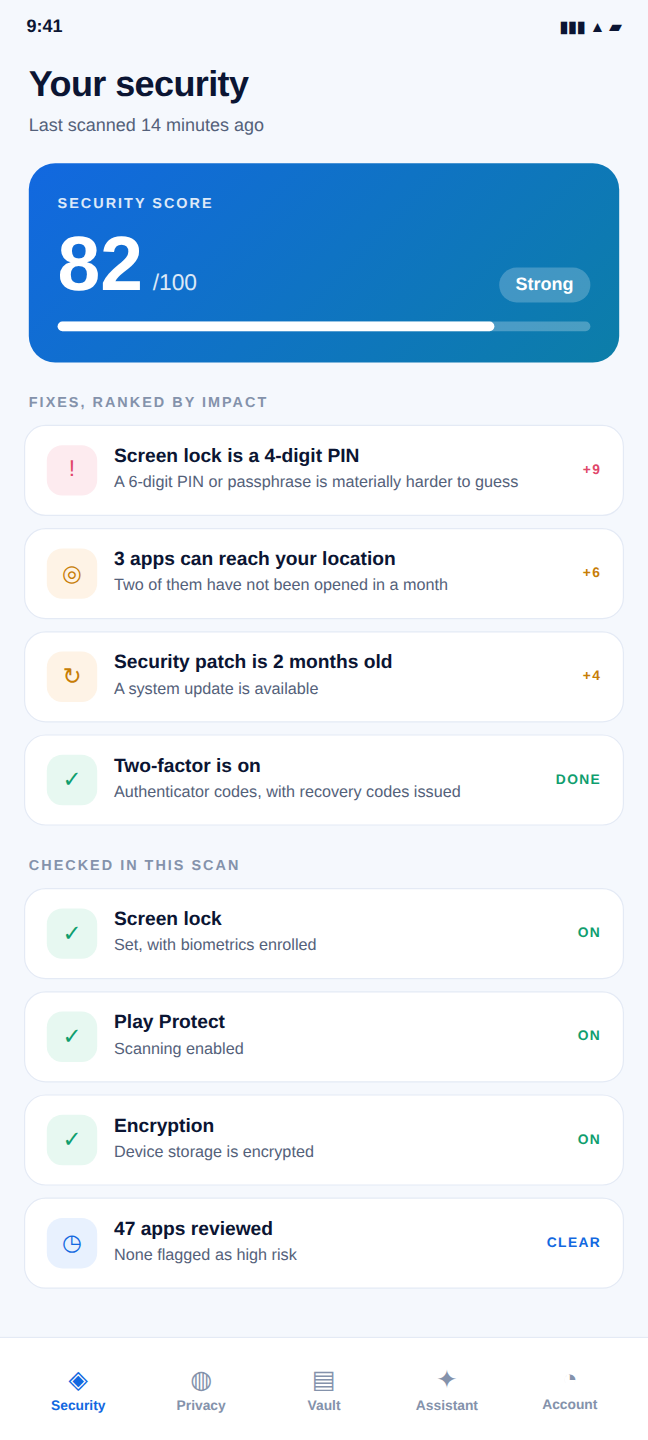
NexGuard is a personal digital security command center for Android. It brings together a security score, a privacy report, an AI assistant, scam and link checks, an encrypted vault, and account two-factor — so you can see and improve your digital safety in one place.
Who is it for?
Anyone who wants a clearer, more honest handle on their phone’s security — especially privacy-conscious individuals. It’s designed for personal use and is intended for people aged 13 and over.
How does it work?
NexGuard reads the security signals your phone already exposes, runs them through deterministic rules engines to produce a score and ranked fixes, and lets the AI explain any result in plain language. Sensitive content stays encrypted on your device.
Which features are available now?
All nineteen ship in the first version — nothing on this site is a placeholder. Free covers the security score and device scan, the privacy report, the vault with its password manager and health audit, two-factor, secure sessions, the account checkup, Wi-Fi safety, breach watching, and the app-usage list in Screen Time. Pro and Family add SafeMode, Reports, App Lock, Clean up, a larger vault, the privacy findings one by one, the Apps risk detail, the AI Assistant with link and message checks, the on-device Authenticator, alert controls, 90-day history, the family dashboard, and the rest of Screen Time — totals, habits, daily limit and bedtime. Urgent findings are never behind the paywall: a high or critical finding is shown on every plan, with the screen that fixes it, and Free sees a count of the lower-risk ones. One thing is honest about being incomplete: email breach monitoring has no data source connected, so it reports “not checked” rather than a result — the password breach check, which uses a free public range API, does work.
What features does NexGuard include?
Nineteen tools in one app: Security Score, SafeMode, Apps, Privacy Report, AI Assistant, an encrypted Vault, a Password Manager, Password Health, Two-factor (2FA), an on-device Authenticator, Secure Sessions, an Account Checkup, App Lock, breach exposure checks, a Wi-Fi safety check, Screen Time, Alerts, Reports, and a family dashboard.
Does the AI make decisions about my security?
No. Scores and verdicts are always computed by deterministic engines. The AI only explains an already-computed result — it can’t produce or override a score.
Freemium & getting started
Is there a free plan?
Yes. The Free plan gives you the core tools with defined daily limits and 1 GB of encrypted vault storage — at no cost.
Does the free plan require a payment method?
No. The Free plan requires no credit card and no payment details at all.
Is there a trial that charges me later?
No. NexGuard has no auto-converting free trial. The Free plan simply stays free until you actively choose to buy a paid plan.
Will I ever see a “$1 verification” charge?
No. NexGuard does not place a $1 authorization or any verification hold on a card. Because paid plans are bought through Google Play, there’s no card-on-file step on our side at all.
What happens when I want more?
Upgrade to Pro or Family from inside the app whenever you like. Nothing changes on the Free plan unless you choose to upgrade.
Is anything urgent ever behind the paywall?
No, and that is the one line we will not move. Every high and critical finding is shown on every plan, on the home screen, with the Android screen that fixes it — a product that notices your phone is unlocked and unpatched and then asks for money before saying so is not a security product. What Pro and Family add is depth: the lower-risk findings listed one by one, the full map of what each app can reach, SafeMode’s own checklist, the reports and the history. Free sees how many lower-risk items are waiting and that none of them is urgent. And since Pro and Family are not on sale yet, the server applies none of these limits today — the app shows you which tools a paid plan would add.
Billing
How are paid plans billed?
Pro and Family are purchased inside the Android app through Google Play Billing. Google processes the payment and manages the subscription.
When does billing start?
Only when you actively buy a paid plan in the app. There is no automatic conversion from Free to paid.
How much will I be charged, and is it recurring?
You’re charged the price shown for the plan and cycle you pick (monthly or yearly). Subscriptions renew at that same price until you cancel.
Can I cancel, upgrade or downgrade?
Yes. Manage everything from your Google Play account. Cancel any time — access continues until the end of the period you’ve already paid for. Upgrades and downgrades follow Google Play’s proration rules.
What happens after cancellation?
Your account reverts to the Free plan at the end of the paid period. Your data stays; features simply return to Free-plan limits.
What if a payment fails?
Google Play handles retries and dunning. If a renewal ultimately fails, the subscription lapses and your account returns to the Free plan.
How do I update my payment method?
Payment methods are managed in your Google Play account, not in NexGuard. We never see or store your card.
Security & privacy
How is my information protected?
Vault contents are encrypted on your device with a hardware-backed AES-256-GCM key; the server stores only ciphertext. Passwords are hashed, sessions use rotated single-use refresh tokens, and the API is rate-limited. See the Security page for details.
Does the website or app store my card details?
No. We never process or store payment cards. Google Play handles all payment information for paid plans.
Does NexGuard monitor me in the background?
No. There’s no silent access to messages, calls, contacts, microphone, camera or screen. Scam and link checks run only on content you paste in yourself.
How do I report a security issue?
Email security@nexonixsystems.com with steps to reproduce. See responsible disclosure.
Age & eligibility
What is the minimum age?
You must be at least 13 years old to use NexGuard. Where applicable law requires a higher minimum age for this kind of service, the higher age requirement applies. See our Terms of Service.
Get early access
Still have a question?
Reach the team directly — we read every message.